• This week, I experimented with training a simple AI model using Code.org’s Oceans activity.

    The task seemed straightforward. Train the AI to recognize fish based on the examples I provided. I felt confident I had trained it well. And yet it still allowed an apple into the fish category.
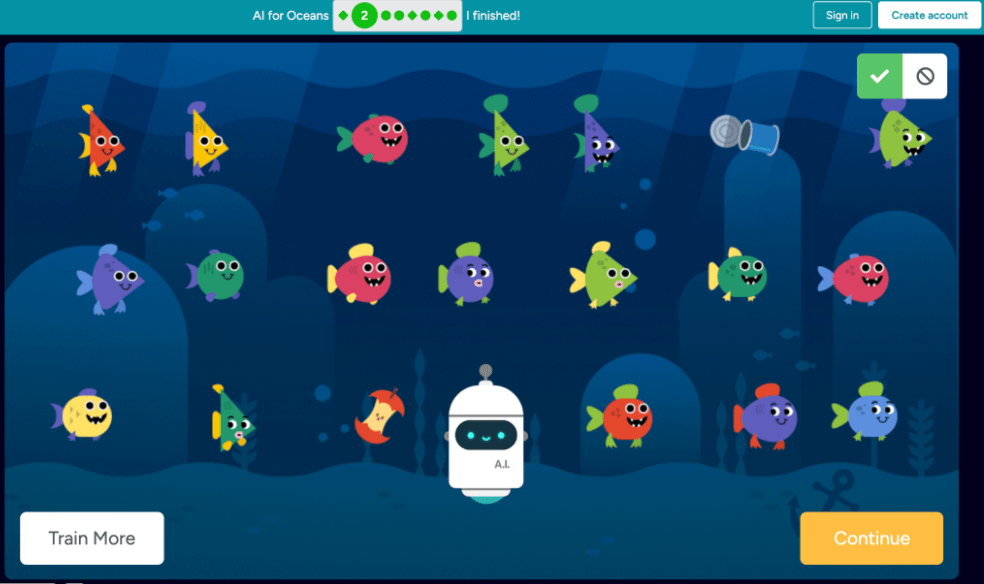
    Figure 1. Example of misclassification: apples incorrectly categorized as fish after training.

    That moment was eye-opening.

    It forced me to reconsider what I thought I had clearly defined. If the AI misclassified an apple, was the problem with the algorithm or with my training data? I began to see how critical it is to provide diverse and precise examples when training a model.

    Another challenge was defining what constitutes a “glitchy fish.” That label was subjective. What I considered glitchy might not match the patterns the AI was identifying. I eventually shifted to labeling fish as “angry,” but even that felt opinion-based.
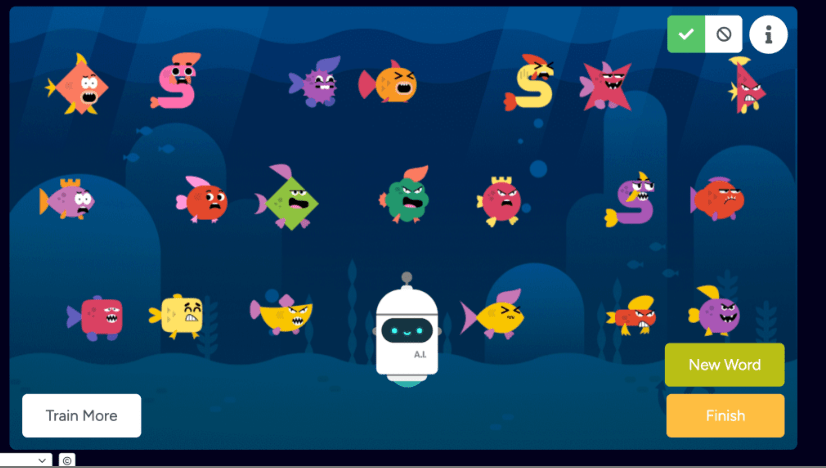
    Figure 2. Labeled examples used to train the AI model (angry, happy, pointy, and glitchy fish).

    This activity highlighted an important point: AI does not understand context the way humans do. It detects patterns based on the data it is given. If the training data is incomplete or biased, the results will reflect that.

    Training AI requires more than technical steps. It requires intentional decision-making and awareness of bias.

    And sometimes, even when you think you trained it well, an apple still sneaks through.
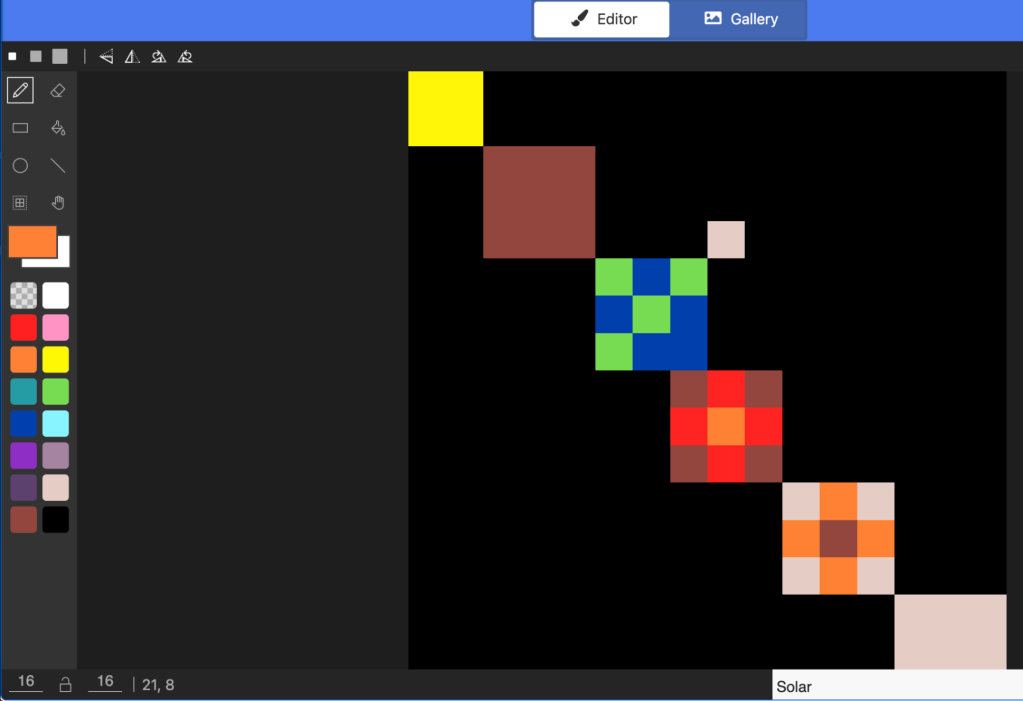
  • After decoding pixel art and recreating it in MakeCode, it was my turn to design both the image and the coding sheet.

    I created a pixelated solar system using MakeCode Arcade, carefully building the image square by square.

    Figure 1. Pixelated solar system rendered in MakeCode Arcade.

    But the real challenge was not the artwork. It was generating the binary coding sheet that would allow someone else to recreate it.

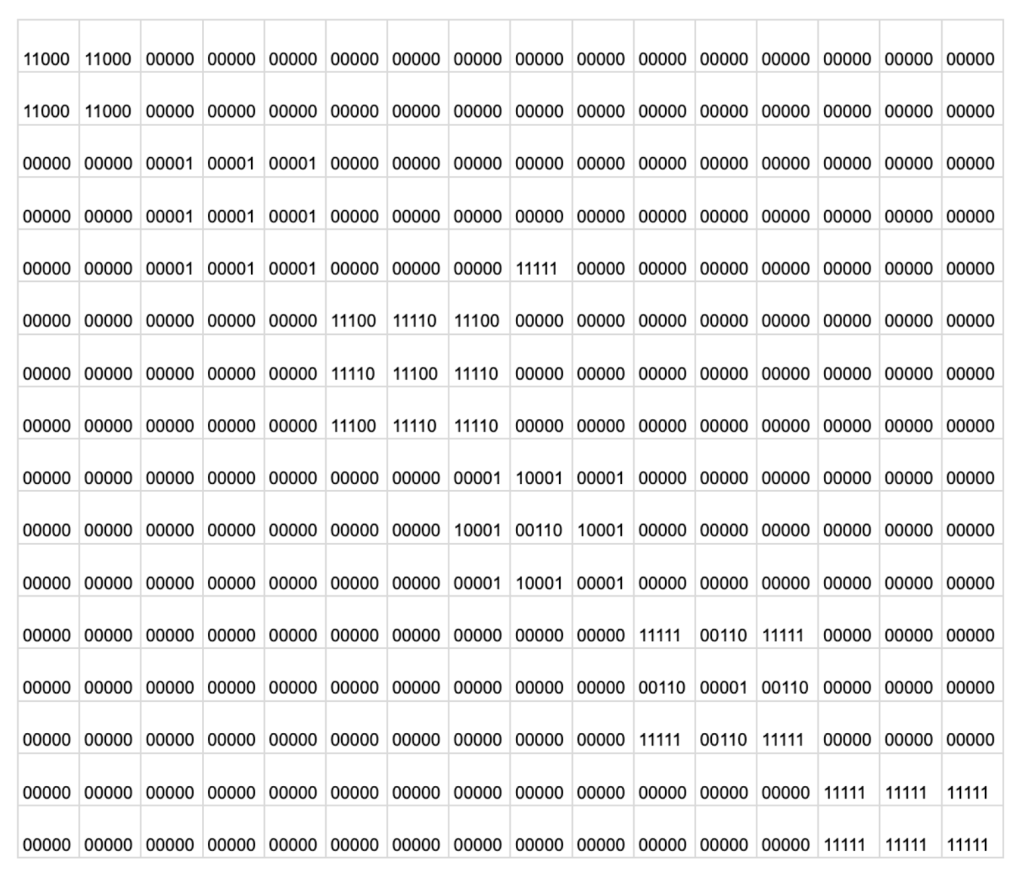
    Figure 2. Binary grid used to encode the solar system image.

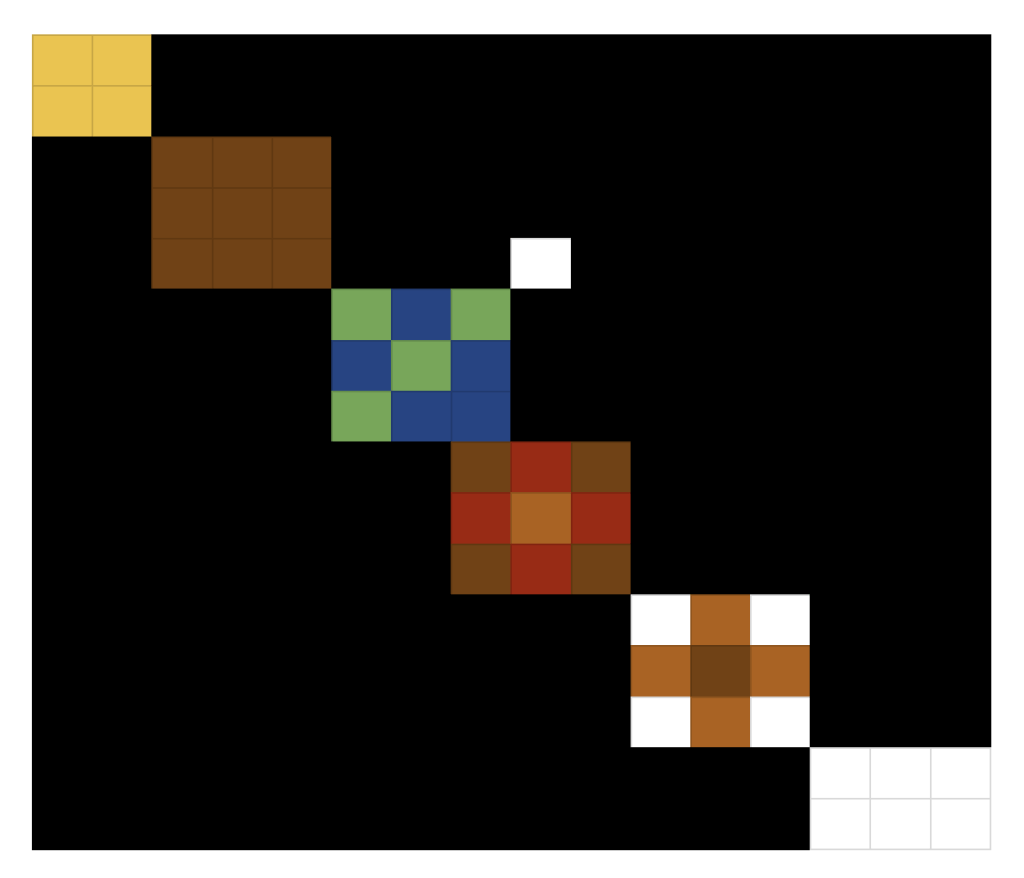
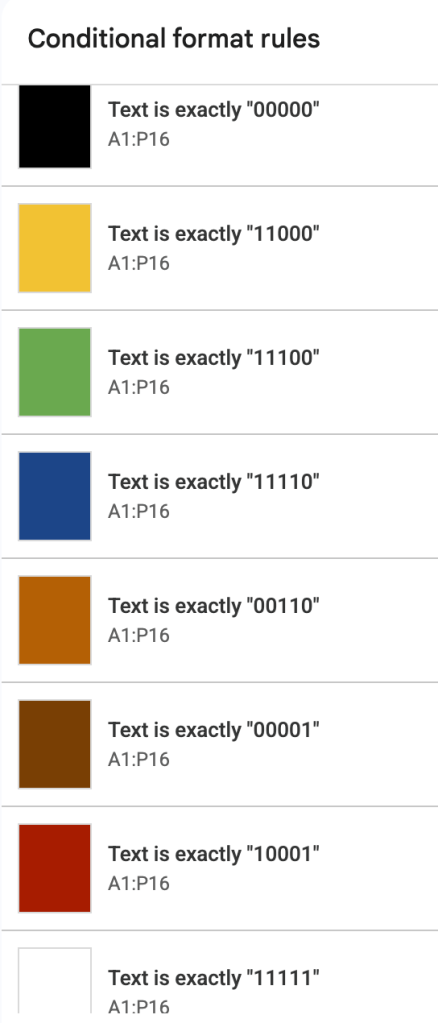
    Instead of writing the binary values by hand, I used Google Sheets to organize the grid. I applied conditional formatting to reveal the image through binary patterns. I would consider myself very average at best with Google Sheets, so I likely spent more time on this than necessary. Still, it felt more efficient than attempting to draft the entire grid manually.

    Figure 3. Solar system revealed through binary values and conditional formatting in Google Sheets.

    In this activity, I felt a shift.

    Previously, I was following instructions and decoding someone else’s structure. This time, I was responsible for both the visual design and the logic behind it. I had to think about how each color would be represented in binary.

    Figure 4. Conditional formatting rules mapping binary values to color.

    I had to ensure the patterns were consistent. I had to test whether the sheet would actually produce the intended image.

    It required precision, but it also required perspective. I had to think not just as the creator of the art, but as the designer of the system.

    What stood out to me most is how clearly abstraction and algorithmic thinking intersect here. The image itself is visual and creative. The binary grid underneath is structured and logical. One does not work without the other.

    Taking it up a notch meant moving from decoding to designing.

    And that shift felt significant.

  • This week, I explored pixel art using the CS UnpluggedPixel Painter” activity.

    Before touching MakeCode, I printed out the coding sheets and manually color-coded them.

    Figure 1. Color-coding the pixel grids before recreating them digitally.

    Each square represented a pixel, and each number or binary pattern corresponded to a color. At first glance, it felt simple. Just coloring boxes.

    But it quickly became clear that this was about precision.

    Every square mattered. One misread number or skipped box changed the entire image. The activity required careful attention to pattern, sequence, and the translation of code into visual representation.

    After completing the sheets by hand, I recreated the images digitally in MakeCode.

    Figure 2. Digital pixel art created from the unplugged coding sheets.

    That transition made the abstraction visible. What began as numbers and binary sequences on paper became structured pixel art on a screen.

    Yet again, this activity reinforced that you do not need a device to begin computational thinking. The logic, pattern recognition, and sequencing all happen before the code is ever entered into a computer.

    Printing, coloring, decoding, and then recreating the image digitally made the process tangible. It slowed everything down and forced me to think carefully about how digital images are constructed one square at a time.

    Pixel art may look playful, but underneath it is structure.

    And once again, precision matters.

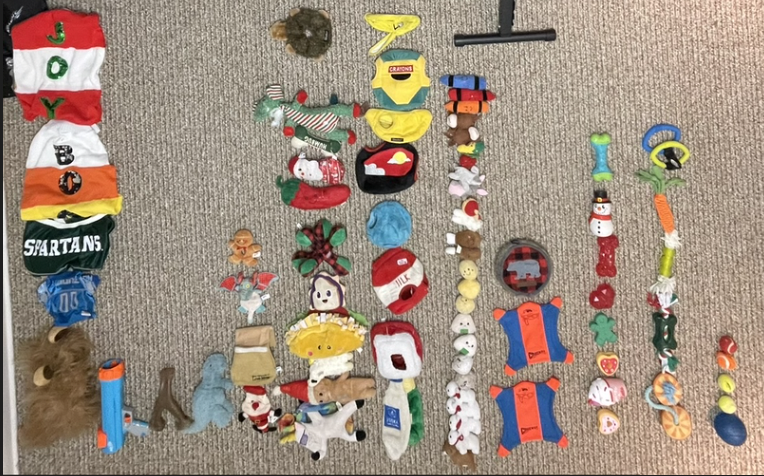
  • For our final decomposition activity before moving into code, I chose something very real: my dog’s toy bin. Yes, my dog again. I couldn’t help it.

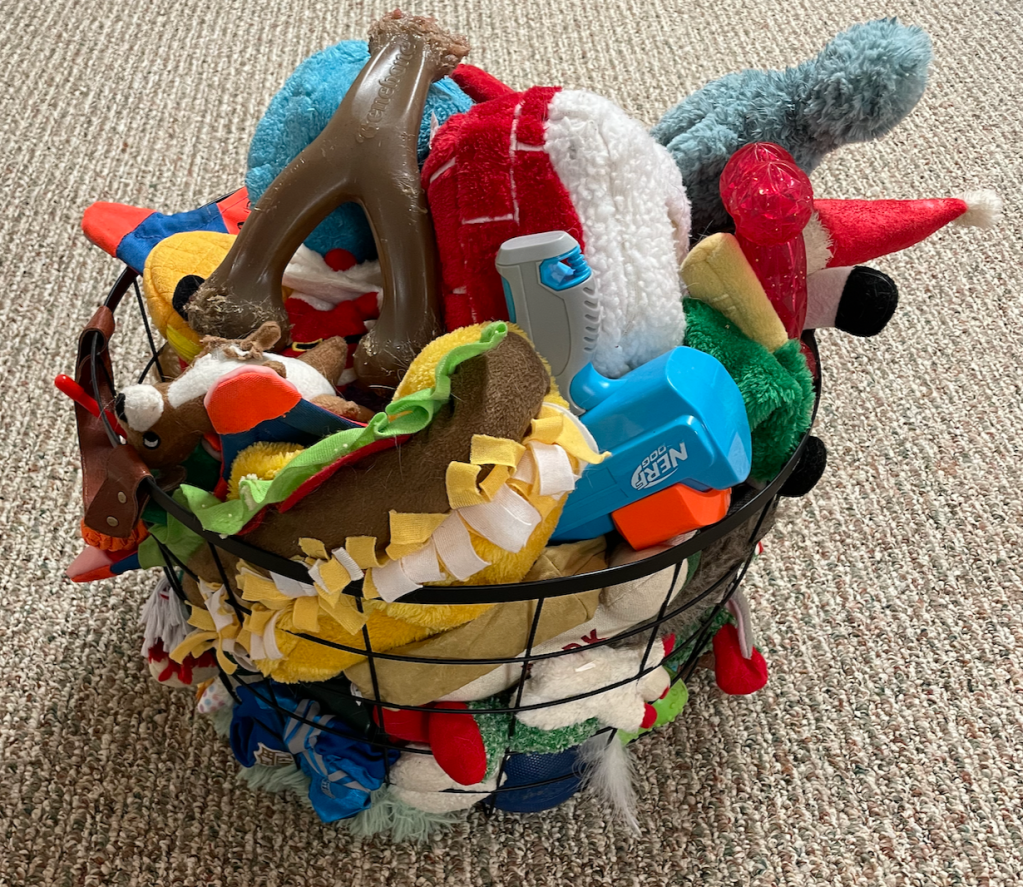
    Figure 1. The chaos before classification.

    At first, it just looks like a chaotic basket of plush, rubber, rope, and squeaky objects. Once I dumped everything out and began sorting, I realized how much decision-making was involved.

    I had to determine my categories first. I landed on (from left to right): clothes, ball launchers, crunchy chews, animals without squeaks, crunchy animals, fuzzy toys with squeaks, toys that get filled with other toys, toys meant to be stuffed inside other toys, frisbees, softer chews, tug toys, and finally balls.

    Figure 2. A structured system emerges.

    The challenge was not sorting. It was defining.

    Many toys could reasonably fit into multiple categories. Is a plush dragon with crinkly paper and a squeaker a “fuzzy toy,” a “crunchy animal,” or both? Decomposition forced me to decide what criteria mattered most. I had to create rules before I could classify.

    This activity made something clear: decomposition is not just breaking things into parts. It is designing a system for how those parts are organized.

    And sometimes, the hardest part is choosing the categories.

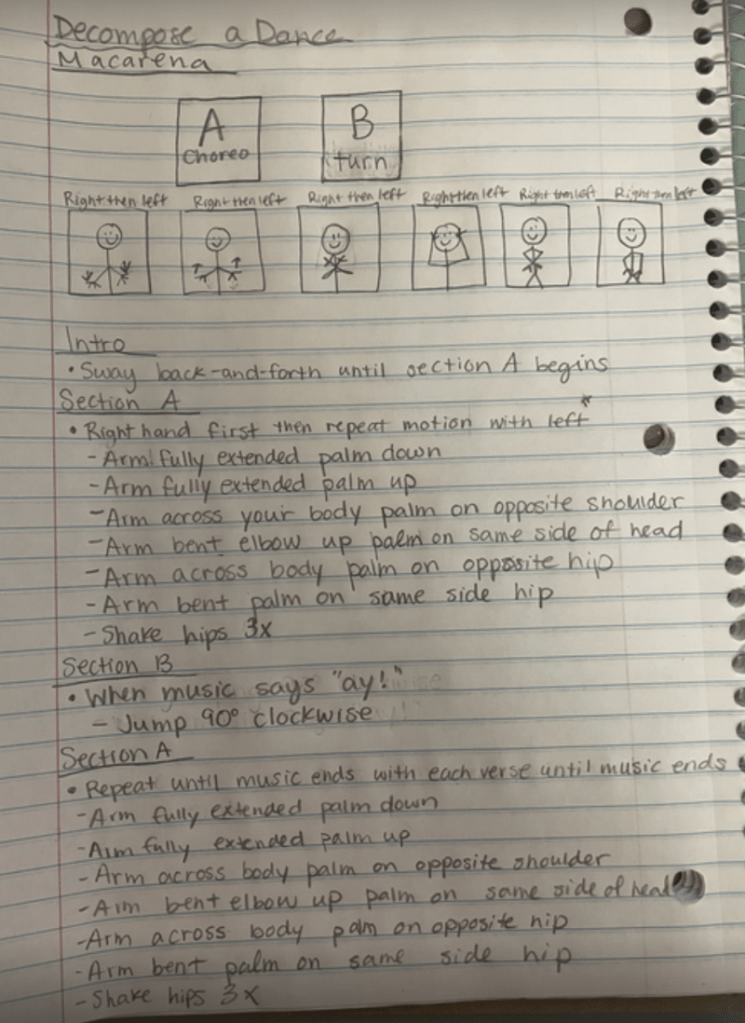
  • For this activity, I was asked to decompose something familiar. I chose the Macarena. In case it’s been a while, here’s a refresher!

    At first, it feels almost silly to break down a dance everyone “just knows.” But once I slowed down and wrote out the steps, I realized how structured it actually is.

    I separated the dance into two sections.

    Figure 1. Decomposing the Macarena into structured sections and repeatable patterns.

    Section A follows a clear right–left repetition pattern. Section B includes the turn, which breaks that symmetry, so it made sense to isolate it. What feels automatic is actually built on sequence and repetition.

    My professor pointed out that I did not need to rewrite Section A again later in the process. Since it repeats exactly, I could simply reference it. That feedback stuck with me. Recognizing repetition and avoiding unnecessary rewriting is both efficient and intentional.

    Decomposing the Macarena reminded me that even the most familiar routines are structured algorithms. We just do not usually stop to notice.

  • Starting Unit 3, we focused on decomposition. Not in theory. Not in abstract computer science language. In real life.

    The task I chose to decompose was simple: packing my dog’s dinner.

    Figure 1. The muse behind the algorithm.

    At first, it feels like one task. Feed the dog. Done.

    But when I slowed down and listed the subtasks, it quickly became more complex:

    • Scoop regular food
    • Scoop venison bits
    • Scoop frozen food
    • Pour warm water
    • Spray joint health

    What initially feels automatic actually contains multiple smaller components. That is decomposition in its purest form.

    Thinking About Dependencies

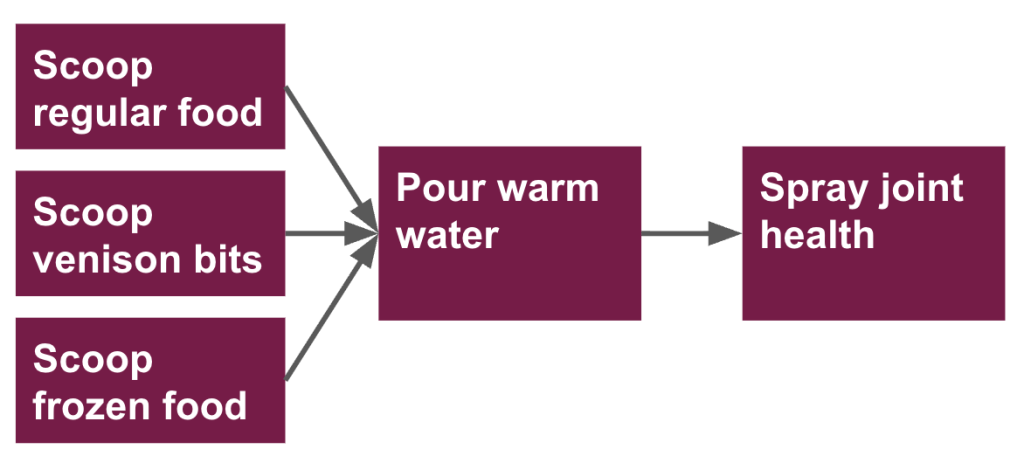
    The next step was to examine dependencies. What can happen at the same time? What must happen in sequence?

    In my case, the three scooping tasks all feed into pouring warm water. The water cannot be poured until the food is in the bowl. The joint health spray comes last.

    Here is how I mapped it visually:

    Figure 2. Decomposing dinner: visualizing task dependencies.

    This step made something clear: decomposition is not just listing steps. It is understanding relationships between steps. Some actions are parallel. Others are dependent. The order matters.

    From Decomposition to Algorithms

    Finally, I zoomed in on just one subtask: scooping regular food.

    Here is the algorithm:

    1. Grab the dog’s food bowl.
    2. Walk to the pantry with the bowl.
    3. Open the pantry.
    4. Open the dog food bag.
    5. Use the cup inside to scoop two scoops of food into the bowl.
    6. Reseal the food bag.

    When I look at this written out, I immediately see the connection between decomposition and algorithmic thinking. Decomposition breaks a large problem into parts. Algorithms clarify exactly how to complete each part.

    One without the other is incomplete.

    This unit reinforced something important for me as an educator. Students often struggle not because they cannot do the task, but because the task feels too big. Teaching them to decompose and then write clear, precise steps gives them a structure for problem solving.

    And apparently, it also ensures my dog gets dinner correctly!

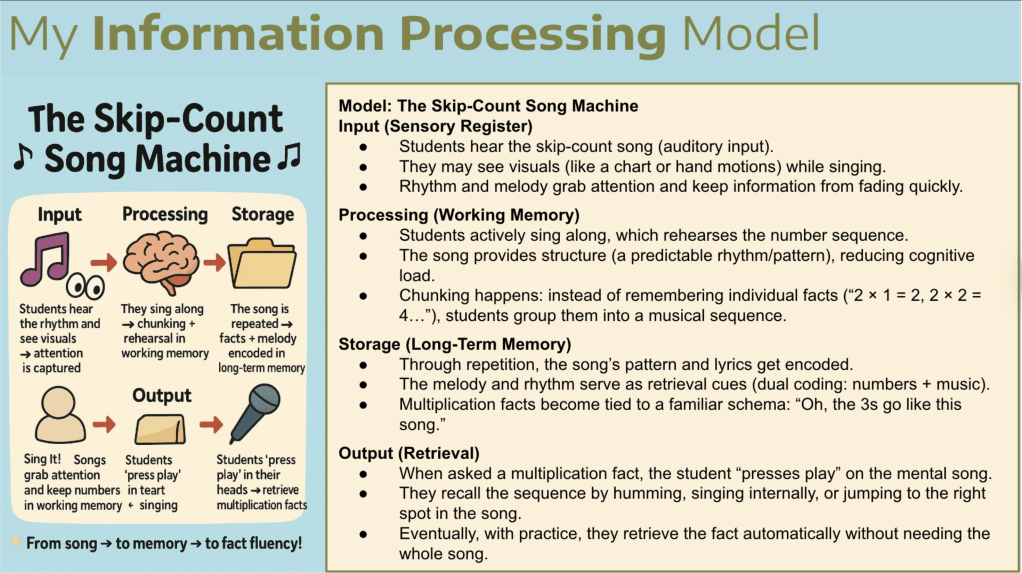
  • If you walk into my classroom during math time, you will probably hear us singing. Skip-count songs are one of my favorite tools for teaching multiplication because they really work! Kids connect to rhythm and melody much faster than to a plain list of numbers. I have seen the magic firsthand. A student who struggles to remember 6 × 7 can sing through the sixes, use their fingers as markers, and suddenly the answer is right there.

    What I love about these songs is how they give students a clear path. The melody keeps the sequence organized, the rhythm sets the pace, and the lyrics help explain the idea of groups of numbers. Instead of juggling disconnected facts, students get a sense of flow and connection. They can visualize the groups, keep track on their fingers, and hear the numbers in order at the same time.

    When I created my Skip Count Song Machine model using the Information Processing lens, it confirmed what I already knew from experience. The songs grab attention during input, support practice and chunking during processing, strengthen memory during storage, and make recall easier when students solve a problem during output. Beyond the theory, what matters most is that these songs make multiplication feel doable. They are fun, engaging, and confidence building, and that is what makes them powerful.

  • For our Algorithms Unit, I designed a lesson centered on a simple yet powerful idea: algorithms extend far beyond computer science.

    My artifact, “Get to Class”, presents students with a realistic problem. A new student has joined our class, but they have never been in the building before. The task is clear: create the perfect algorithm to help them get from the front door to their table.

    An algorithm, as we defined in the lesson, is simply a clear set of step-by-step instructions used to solve a problem. But what makes this activity meaningful is our emphasis on precision.

    It immediately reminded me of a science lesson I have done for years: asking students to write instructions for making a sandwich, then following them exactly as written. If they forget to say “open the jar,” I smear peanut butter on the lid. If they say “put the bread down,” I drop it on the floor. The chaos is funny, but the lesson sticks. Precision matters!

    This artifact builds on that same idea. Students must:

    • Break down the building into parts.
    • Identify landmarks.
    • Use clear directional language.
    • Draw a simple floor plan.
    • Test their algorithm to see if it actually works.

    Computational thinking shows up naturally. Students decompose the space, sequence their steps, and refine their instructions when something is unclear. They also practice empathy. By imagining what it feels like to be new, the task connects to social-emotional learning in an authentic way.

    What I appreciate most about this creation is how clearly it connects theory to practice. Algorithms are not abstract coding concepts. They are how we navigate hallways, follow recipes, build shapes in math, and explain our thinking.

    Everything we do can be broken down into an algorithm!

    This unit reinforced something important for me: computational thinking is not about screens. It is about clarity, precision, and helping students understand that words matter, especially when someone else has to follow them.

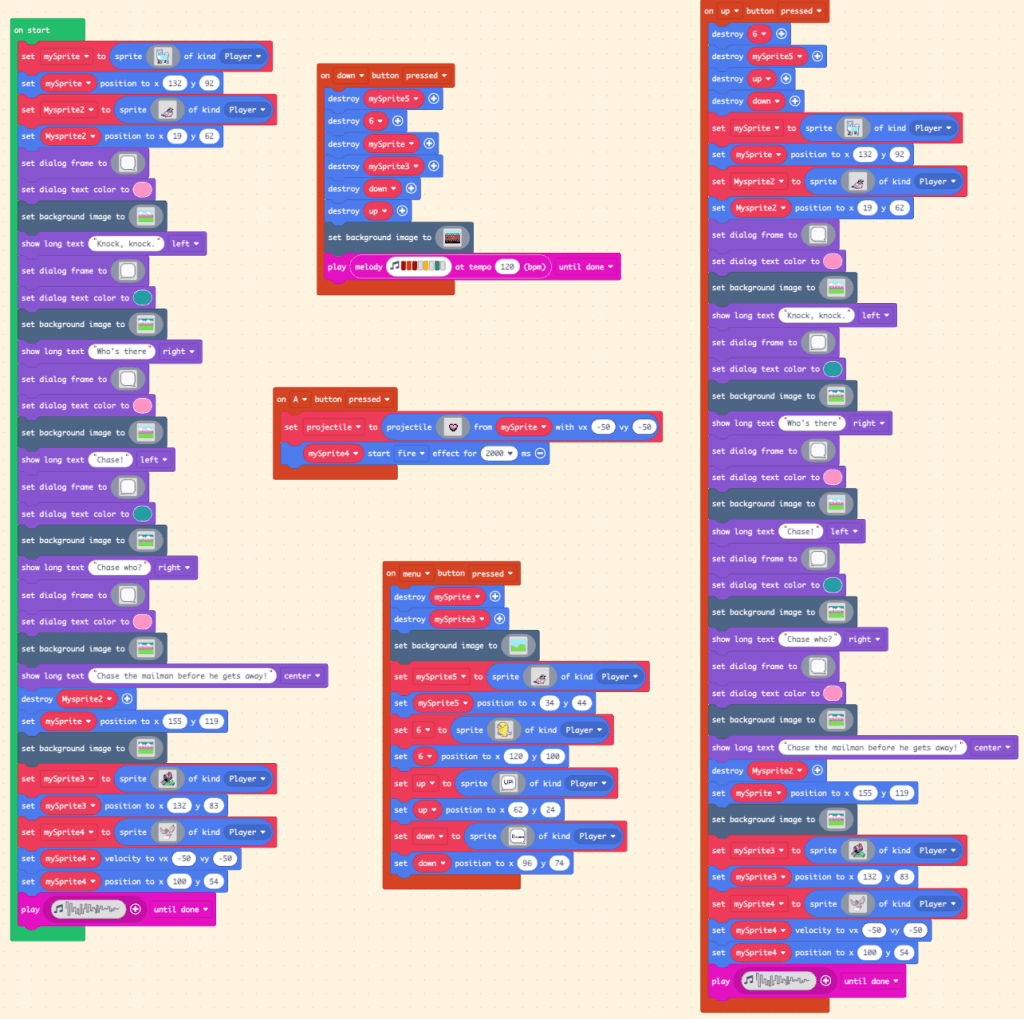
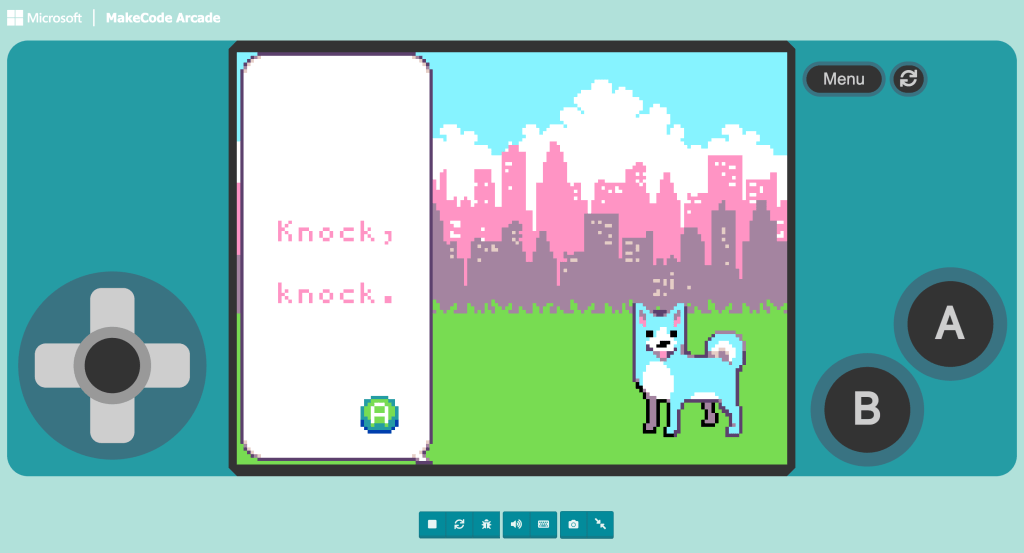
  • After designing a lesson that highlighted computational thinking in geography, I stepped into something completely different: creating a knock-knock joke in MakeCode Arcade.

    At first, it sounds simple. It is just a joke. But building it in code forces me to think differently. I have to break down the entire interaction into small, logical steps. What happens first? What triggers the response? What should appear on the screen next? That is decomposition in action.

    Even something as familiar as a knock-knock joke has a structure. There is a predictable sequence: “Knock, knock.” “Who’s there?” Name. “Name who?” Punchline. Translating that pattern into code makes the structure visible. That is pattern recognition. When I get stuck, I revisit previous projects from the beginner skill map and look for familiar code structures. Recognizing patterns in earlier work helps me build new functionality with more confidence.

    Figure 1: Every punchline has a process: a look at my code for this assignment.

    I also found abstraction challenging. MakeCode offers so many buttons and possibilities, and I kept wanting to add extra features simply because I could. Focusing only on what was essential to the joke took discipline, although I did experiment a bit beyond the scope of the assignment.

    What I love about this project is how clearly computational thinking shows up. Humor, logic, sequencing, and debugging all connect. If the timing is off or the button triggers the wrong response, the joke falls apart. Code does not allow ambiguity.

    This creation reminds me that computational thinking is not just about building complex games. It is about structure, precision, and intentional design, even in something as simple and playful as a knock-knock joke.

    You can view my MakeCode project here:

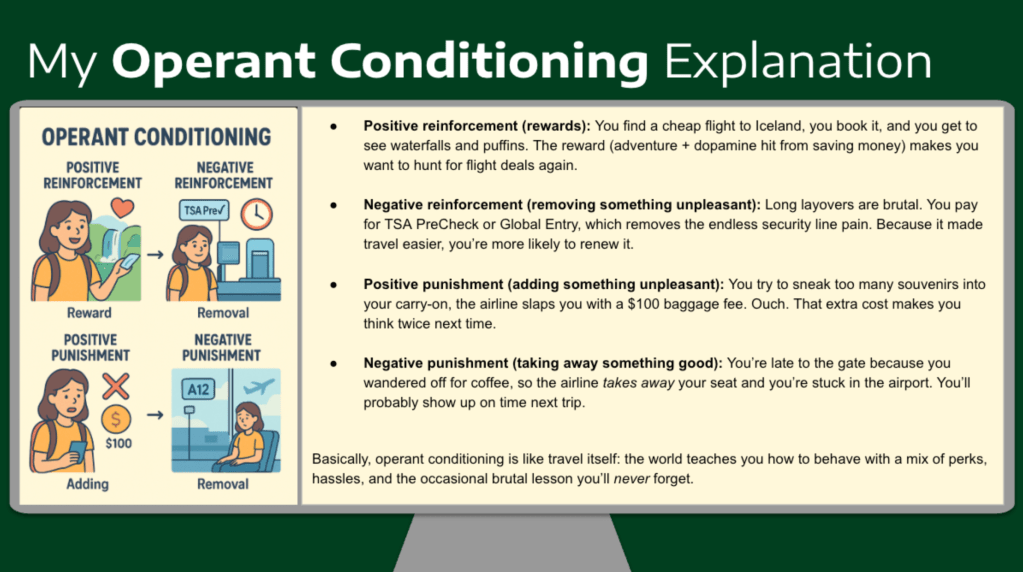
  • asked ChatGPT to relate my love for traveling to OC, and I can see how these have played a role in my life! Positive reinforcements could be cheap flights or lodging. Negative reinforcements would be paying for PreCheck or a nice hotel. Positive punishment would be a charge on an overstuffed carry-on, and finally, a negative punishment would be missing a flight. I have experienced all of these positives and negatives! It is interesting to see how it has changed my behavior when traveling.

    I think one challenge OC faces is the potential for a post-reinforcement pause in behavior. The “I have my reward, so I’m done” mindset. This was described for most partial reinforcement schedules. Another challenge would be that with a continuous reinforcement schedule, extinction is likely at a faster rate.

    *My ChatGPT crashed so the graphic I was able to screenshot before it vanished is not in the shared link 😦