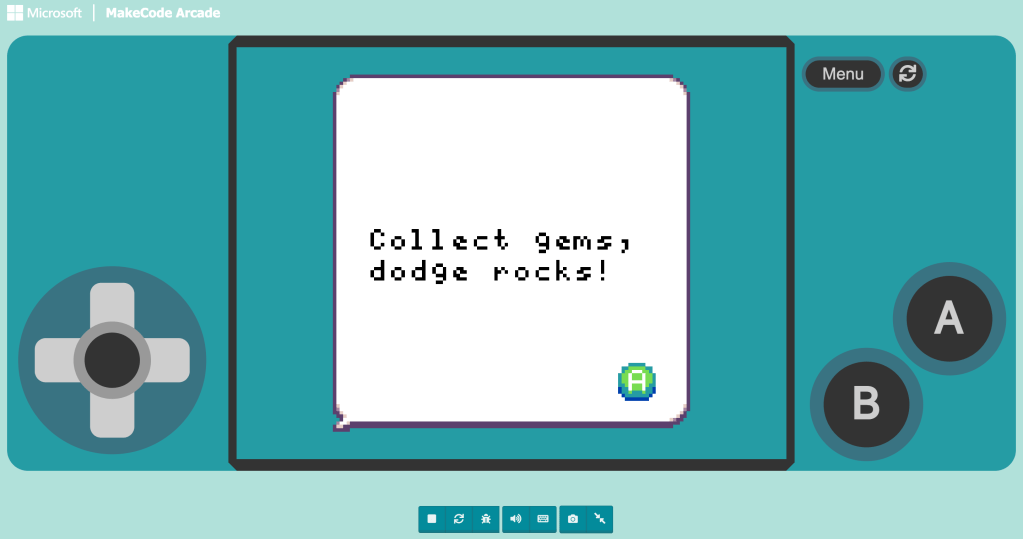
• If there is one constant in this course, it’s this: MakeCode Arcade is my favorite part of every unit!

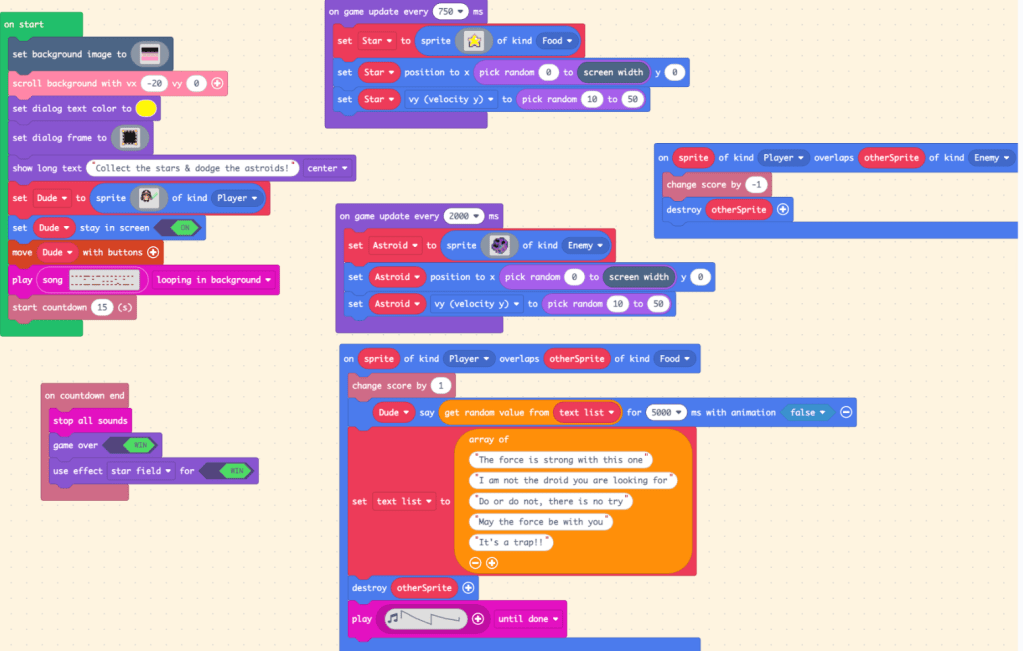
    For this creation, I built a Jedi-themed game. The concept sounds simple. A character runs across space collecting stars and dodging asteroids. Stars add points. Asteroids subtract them. A countdown runs. The Star Wars–inspired theme plays in the background. Collect a star and the Jedi says something dramatic like, “Do or do not, there is no try.”

    Simple. Except it wasn’t.

    When “Simple” Breaks

    What looked straightforward on paper quickly turned into a debugging session. Stars were spawning in one place. My score was skyrocketing even though I was certain I had destroyed the sprite after awarding +1. Things were happening…just not the way I thought they should.

    That was the moment computational thinking became real. I had to stop assuming and start observing. What was the code actually doing? Not what I intended and not what I pictured. What was it actually doing? That change in thinking matters.

    Figure 1. Code structure for spawning stars, asteroids, and handling overlap events

    Computational Thinking in Action

    This project forced me to use multiple components of CT:

    • Decomposition: I broke the game into parts. Player movement. Star spawning. Asteroid spawning. Overlap logic. Scoring. Countdown.
    • Pattern recognition: I noticed that my star and asteroid logic followed a similar structure. Once I saw that pattern, I reused and adjusted instead of rebuilding from scratch.
    • Abstraction: Instead of writing separate dialogue blocks for each Jedi quote, I created a list of sayings and pulled from it randomly. One structure with multiple outputs.
    • Algorithmic thinking: I had to think step by step about what happens first, what triggers next, and what conditions change the outcome.

    Even the music became part of the abstraction conversation. In earlier projects, I had used solfege, which was incredibly limiting. This time, I used the sheet music tool and built a looping background theme using structured notation. Instead of isolated tones, I was thinking in sequences and patterns.

    That felt like I was leveling up.

    What the Player Sees vs. What’s Actually Happening

    From the outside, the game looks playful:

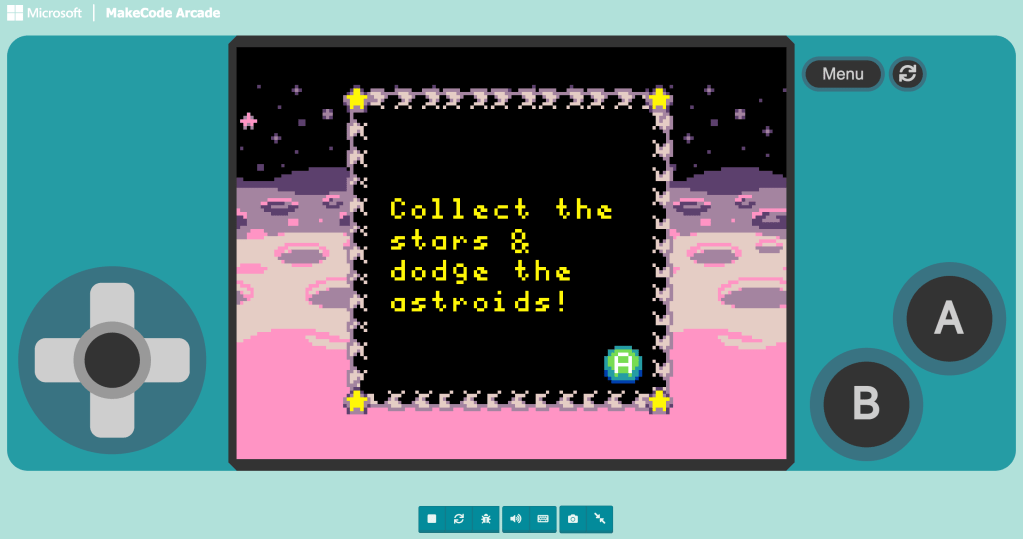
    • A Jedi hobbling across a planet in space
    • Raining stars and asteroids
    • Random quotes popping up
    • A dramatic looping theme song

    Click to play my game:

    Figure 2. Gameplay view of the Jedi star-collecting game in action

    But underneath that is logic layered on logic. Every visual moment depends on conditions, timing, variables, and structure. When one tiny piece is off, the whole illusion cracks.

    Why This Matters

    What I appreciate most about MakeCode is that it forces thinking into the open. You cannot hide incomplete logic. The computer does exactly what you tell it to do. Debugging becomes less about frustration and more about investigation. What assumption did I make? What step did I overlook? What rule did I forget to define?

    The hands-on process makes computational thinking tangible. Not theoretical. Not vocabulary. Not a worksheet definition. It’s thinking you can see.

    And honestly? That’s the experience I want my students to have too!

  • Schools regularly point to learning theory as justification for instructional practices, but the way those theories are used in classrooms rarely reflects how learning actually occurs for students. The gap is not about teachers misunderstanding theory, but about schools attempting to layer multiple theories at once without creating the conditions that make any of them effective. What results is a system that looks theoretical on paper but functions as compliance in practice.

    What Schools Think They’re Doing

    Schools believe they are implementing behaviorism, cognitivism, and social learning to support growth. Attention getters are treated as classical conditioning, assumed to cue instant silence (McLeod, 2024). Write-ups are framed as operant conditioning, intended to change behavior through consequence (Cherry, 2024). Scripted curriculum is marketed as schema-building, connected to cognitivist ideas about sequencing knowledge so it encodes into memory (Putnam and Borko, 2000). Whole-group lessons are described as constructivist because students are “given” knowledge before applying it. Manipulatives are displayed as constructionism, even though most activities are teacher directed reproductions rather than student created models. Schools also reference Vygotsky’s Zone of Proximal Development to justify grouping and proximity support (Vygotsky, 1979), and they call group work collaboration, assuming it reflects social learning. The language is correct, but the implementation is shallow. These strategies gesture toward theory instead of embodying it.

    What Actually Happens in Classrooms

    In practice, these strategies break down quickly. Many students repeat the attention getter but keep talking, showing there is no conditioned behavioral shift. Write-ups become documentation rather than reinforcement because there is rarely a meaningful consequence attached. Scripted curriculum forces teachers to cover content rather than connect it, and they are blamed when students fail to meet benchmarks despite “following the program.” Whole-group instruction widens learning gaps in classrooms where readiness levels stretch across several grade levels. Manipulatives become compliance tools instead of thinking tools, used to produce the teacher’s predetermined answer. Group work is often one student doing the writing while the others stay passive. Real learning happens, but it happens around the system, not because of it.

    The Assessment Mismatch

    The biggest problem with assessment in school is that scores end up mattering more than the actual learning behind them. Students memorize information just long enough to retrieve it, but because it is only stored in short-term memory and never linked to prior knowledge, there is no real schema to connect it to. They are not building understanding but rehearsing. Cognitivism shows that learning sticks when encoding leads to meaningful retrieval (Putnam and Borko, 2000), but the pace of curriculum prevents students from ever getting there. In data meetings, the conversation is whether numbers moved, not whether thinking deepened. Students may never hear the meeting, but they feel its impact when instruction is rushed and curiosity is treated as a distraction. High-performing students learn their value lies in staying ahead, while struggling students learn they are permanently behind. Instruction becomes about surviving the pacing map instead of working within a child’s actual ZPD. The test becomes the finish line and the number becomes the identity, which is the opposite of what learning is supposed to be.

    Where Real Learning Actually Happens

    Real learning shows up when students can participate, observe, and make meaning in context. It appears when students learn from peers through modeling, which reflects observational learning (Bandura, 1971). It happens when one student becomes a more knowledgeable other for a classmate through natural apprenticeship instead of teacher assignment. It surfaces when students engage with their environment and the learning is situative rather than scripted. One example is when my class went outside and built arrays using wood chips, sticks, and leaves. The content was identical, but the change in environment transformed their thinking. Students were testing, revising, troubleshooting, and explaining. They were immersed in a community of practice rather than performing understanding for a worksheet. The motivation came from relevance and participation, not reinforcement charts.

    The Big Claim

    What school delivers most of the time is education, not learning. Education is passive, curriculum centered, and driven by extrinsic performance goals. Learning is active, curiosity driven, and rooted in intrinsic motivation. When instruction serves pacing rather than understanding, students perform knowledge instead of developing it. Curiosity becomes something to “fit in later” instead of something to build from. The most meaningful academic moments are often the ones that stray from the script, when student questions lead to investigation, connection making, and discovery. Those are the moments where students are not being educated but are becoming thinkers.

    Reframing What School Could Be

    If the real focus of school were learning instead of assessment, classrooms would function differently. Students would have agency in the questions being explored. Apprenticeship and peer modeling would be normalized rather than incidental. Scaffolding would be responsive instead of standardized. Classrooms would operate as communities of practice, where ideas are built, tested, and revised, not rehearsed for a score. Assessment could support learning if it measured participation, transfer, and growth within authentic activity, aligned with situated learning principles (Lave and Wenger, 1991). In a school built around learning, students would not perform understanding to prove mastery. They would interact with ideas until mastery becomes visible on its own.

    References

    Bandura, A. (1971). Social learning theory (Vol. 1). General Learning Press.
    Cherry, K. (2024, July 10). Operant conditioning in psychology: Why being rewarded or punished affects how you behave. Verywell Mind.
    McLeod, S. (2024, February 1). Classical conditioning: How it works with examples. Simple Psychology.
    Putnam, R. T., and Borko, H. (2000). What do new views of knowledge and thinking have to say about research on teacher learning? Educational Researcher, 29(1), 4 to 15.
    Vygotsky, L. S. (1979). Consciousness as a problem in the psychology of behavior. Russian Social Science Review, 20(4), 47 to 79.
    Lave, J., and Wenger, E. (1991). Situated learning: Legitimate peripheral participation. Cambridge University Press.
  • Unit 6 shifted my focus to automation, and it immediately felt relevant to students’ everyday lives.

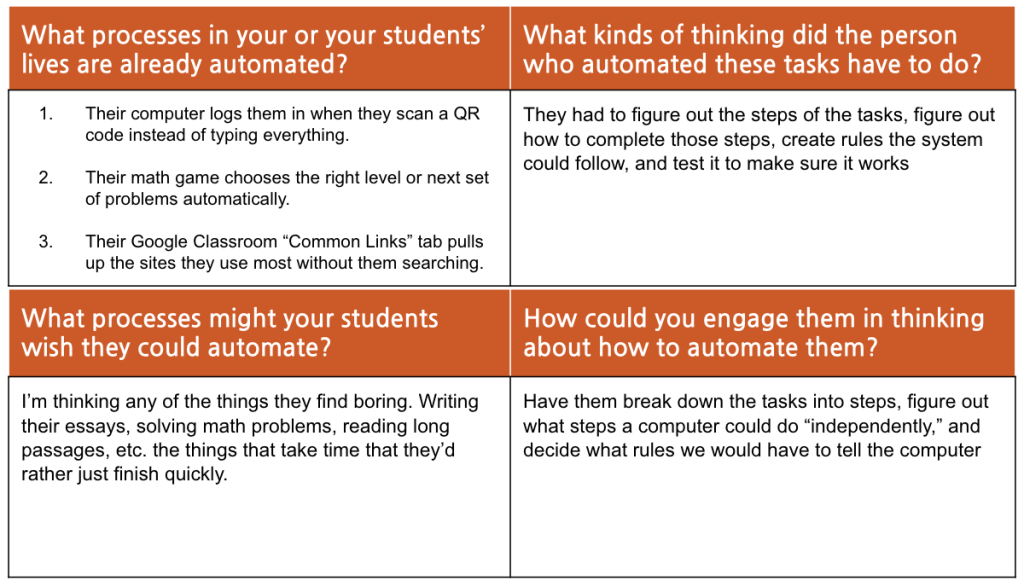
    In my first activity, I brainstormed examples of automation my students already experience. Their computers log them in automatically when they scan a QR code. Math platforms adjust difficulty levels without a teacher intervening. Google Classroom surfaces commonly used links so students do not have to search for them.

    Figure 1. Brainstorming examples of automation in students’ everyday lives

    When we pause to name it, automation is everywhere.

    What struck me most was the thinking required behind those systems. Someone had to break down the task into steps, determine rules the system could follow, anticipate edge cases, and test the process. Automation is not about replacing thinking. It is about doing the work up front.

    When I asked myself what students might wish they could automate, the answers were predictable: writing essays, solving long math problems, and reading extended passages. The “boring” tasks that are time consuming.

    That opens a fun classroom conversation. If you wanted a computer to write your essay for you, what steps would it need? What rules would you have to define? What decisions would it struggle to make? Breaking down those processes reveals the complexity students (and teachers) often underestimate.

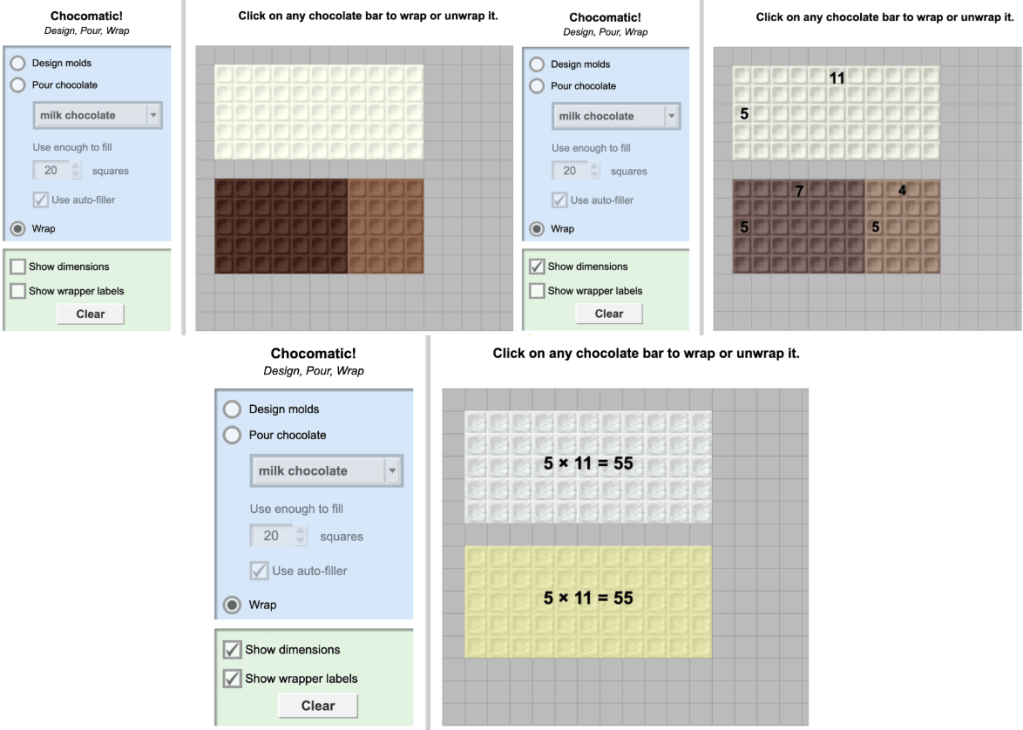
    To bring automation into math instruction, I created a simulation lesson using the Chocomatic simulator fromExploreLearning’s Gizmos platform. Gizmos provides structured simulations with built-in lesson materials, but I designed my own activity plan around this tool to align specifically with my focus on arrays, decomposition, and the distributive property.

    In the lesson, students build an array in the simulator, then decompose it into two smaller arrays and record the corresponding equations. They repeat the process in a second way and compare what changed and what stayed the same.

    This activity highlights automation in a subtle way. The simulator removes the manual drawing process so students can focus on structure. The repeated steps of build, decompose, record, and compare, mirror algorithmic thinking. Students are basically creating a repeatable procedure for breaking apart multiplication facts.

    The partner challenge adds another layer. When students show only the decomposed arrays and ask a partner to reconstruct the original, they are reasoning about the underlying structure rather than just the surface representation.

    Automation in this context is not about speed but about clarity. It allows students to see patterns and relationships without getting lost in mechanics. The more I think about it, the more I realize that automation is really about designing systems that handle repetition so humans can focus on reasoning.

    And that is something worth making visible to students.

  • For my final creation in Unit 5, I designed a lesson titled Seeing What Matters: Abstraction in Art and Computer Science.

    My key takeaway from this unit is that abstraction is about identifying what truly matters and setting aside the rest. When we understand the essential features of something, the bigger idea becomes clearer. The details that were removed are not gone forever, but they are no longer necessary for understanding.

    This lesson connects abstraction across art, AI, and classroom practice.

    I begin by asking students to imagine drawing a detailed object in just ten seconds. What would they keep? What would they leave out? That conversation sets the stage for defining abstraction as keeping the important parts and removing extra details.

    Then we examine Picasso’s Bull series. As Picasso redraws the bull again and again, details disappear. The shading fades. The muscles simplify. Eventually, only essential lines remain, yet we still recognize the bull. That progression makes abstraction visible.

    Figure 2. Picasso’s Bull series, a visual example of abstraction as the gradual removal of nonessential detail

    From there, students shift to Quick, Draw!, where a computer attempts to recognize their sketches. The question becomes: What features does the computer need in order to recognize the object?

    To go beyond simply playing the game, I would extend the lesson by challenging students to try to “stump” the AI. Can they remove just enough detail to confuse the computer while still making the object recognizable to a human? That angle introduces a deeper layer of thinking about how humans and machines interpret patterns differently.

    Students already use abstraction constantly. They underline key information in word problems. They summarize by selecting the most important events. They explain the rules of a game without listing every possible scenario. Naming abstraction when it happens helps students recognize that this is not a new skill, but one they already use.

    Computation strengthens that skill. Coding requires identifying only the essential steps for a program to run. Extra instructions create confusion. Missing instructions cause failure. Abstraction in computer science mirrors abstraction in reading, writing, math, and even art.

    This lesson brings all of that together. Abstraction is not about making something smaller. It is about making it clearer. And helping students see what matters is a skill that extends far beyond computer science.

  • This MakeCode project was focused on abstraction… and it humbled me.

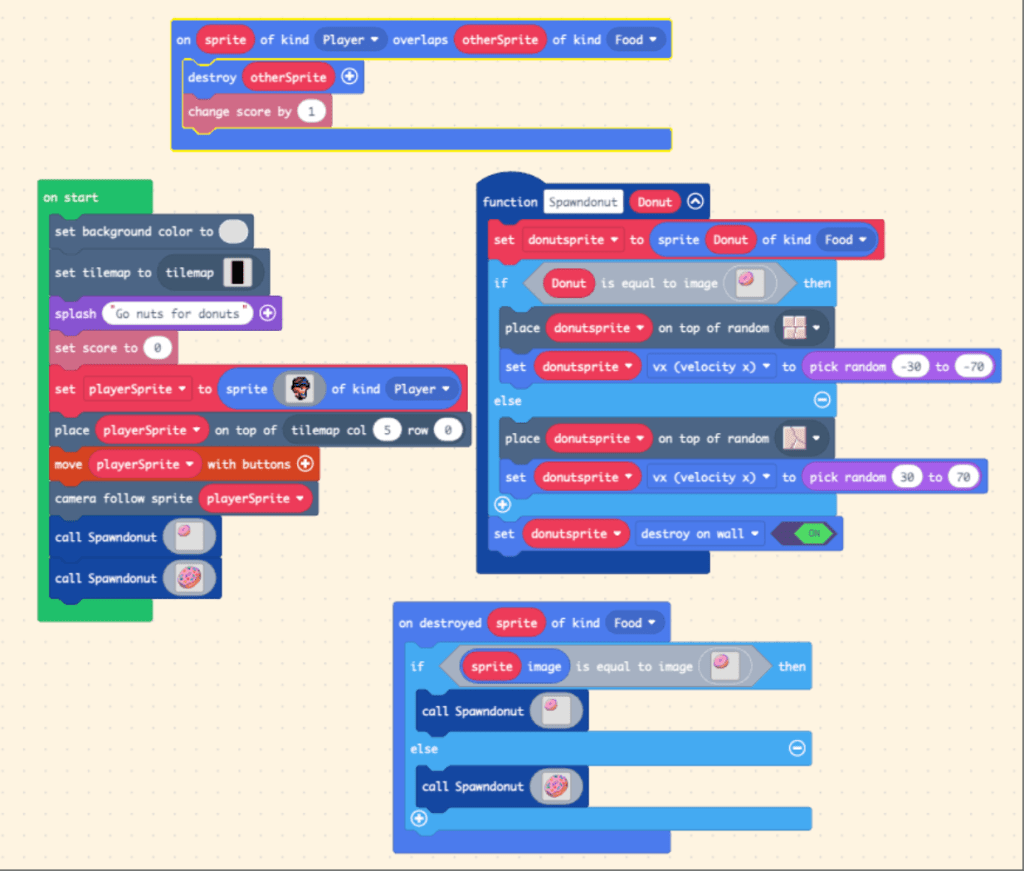
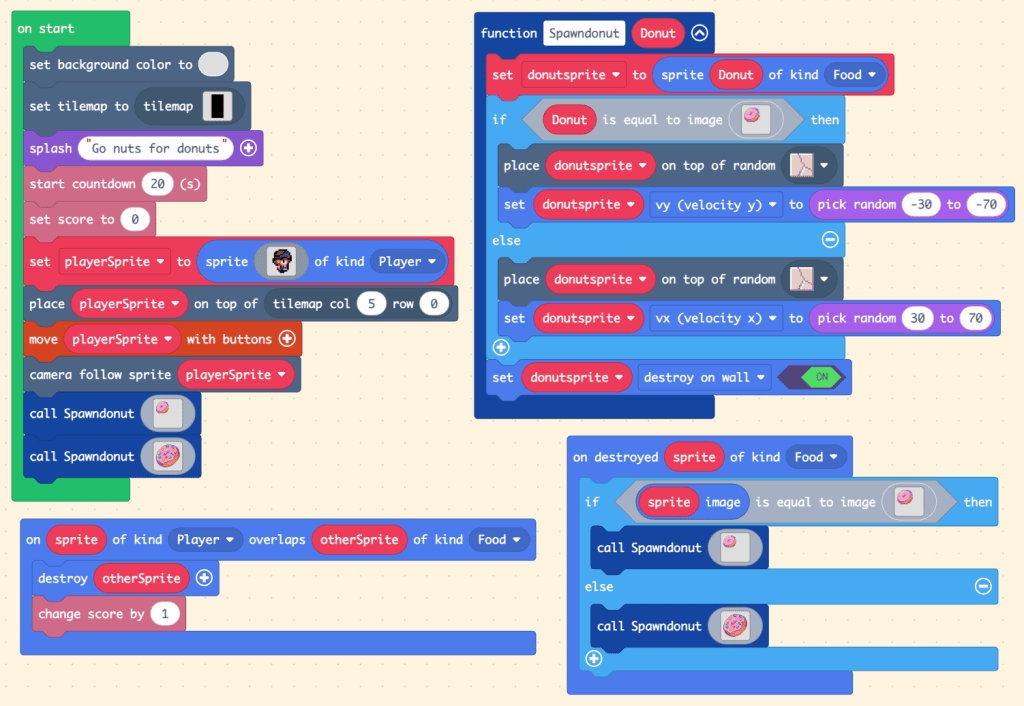
    I went into it thinking it would be a quick build. My plan felt simple: instead of donuts subtracting points, I wanted them to add points. I also wanted one type of donut to be worth more than the other. Conceptually, it made sense. In practice, everything broke.

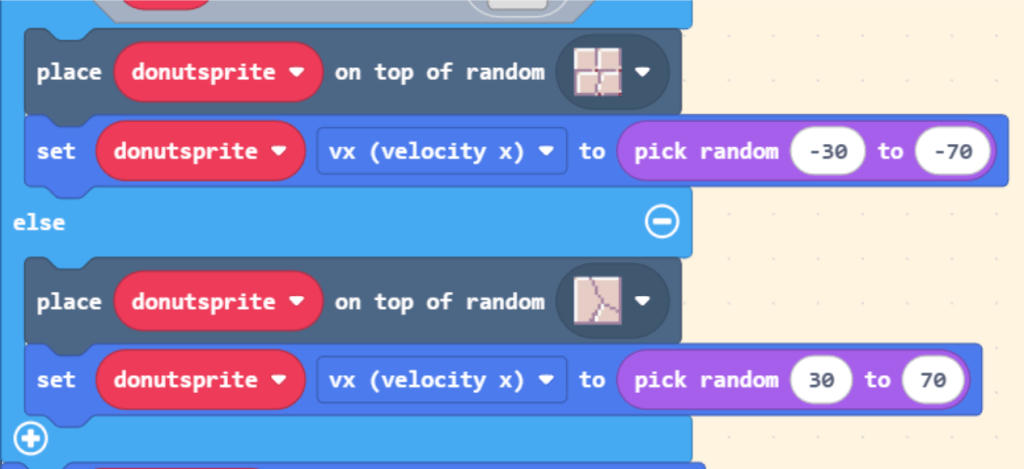
    The main issue? I could not get multiple donuts to continue spawning across the screen. I kept adjusting the function and overlap logic, but something was off.

    Figure 1. First iteration of the spawning function before identifying the tile placement bug.

    At one point, I did not even get to the “bells and whistles” because the basic mechanics refused to cooperate.

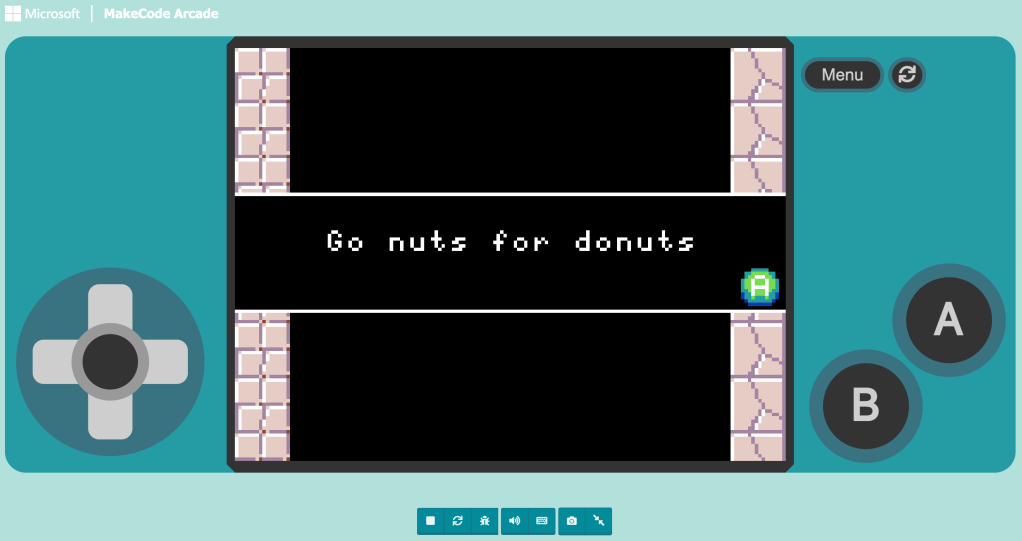
    Here is my first iteration of the game (click to play):

    After some serious frustration, my professor helped me identify the bug. The issue was not in the scoring logic at all. It was in my tile setup.

    Figure 2. Tile configuration causing donuts to spawn and move off-screen instead of crossing the play areabug

    Both tile types existed on both sides of the wall. That meant donuts would sometimes spawn on the right side and move right, or spawn on the left side and move left. Technically, the code was working. Visually, nothing appeared to move across the screen.

    It was not an abstraction problem but a spatial logic problem. Once I separated the tile types so they were consistently placed on opposite sides, the spawning worked much more consistently.

    Here is the corrected version (click to play):

    Figure 3. Revised code after correcting tile placement and spawning logic

    That said, the game is still not perfect. The smaller donuts do not always continue spawning the way I originally envisioned. Sometimes only one or two appear before stopping. There is still something in my logic that needs refining. And honestly, that feels important to say.

    This experience taught me something critical about abstraction in programming. When we create generalized functions, we assume the environment supports them. But abstraction only works when the underlying system is consistent and fully aligned with the logic we design.

    I was so focused on making the donuts “smarter” that I missed a simple environmental constraint. And now, even in the improved version, I can see there are still edge cases I have not accounted for. Debugging forced me to slow down, isolate variables, and test assumptions. It was frustrating in the moment, but incredibly clarifying afterward.

    Abstraction makes systems manageable, but it demands precision. And sometimes, the bug is not where you think it is.

  • This week, I explored several AI tools through the lens of abstraction and computational thinking, and I had an absolute blast!

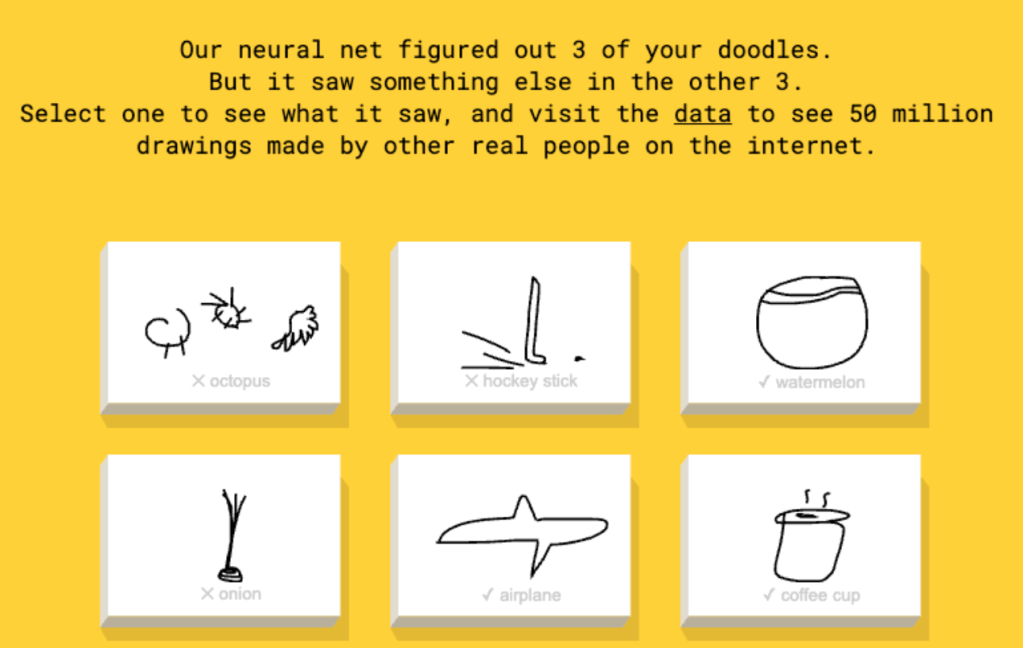
    I started with Quick, Draw! and immediately went down a rabbit hole.

    Figure 1. Quick, Draw! identifying and misidentifying sketches in real time based on learned patterns.

    After a few normal rounds, I began testing the limits. I tried drawing the most abstract versions of objects I could, just to see if I could stump the system or “teach” it something new. It was oddly addictive.

    What stood out most was how clearly AI mirrors computational thinking. The model learns by identifying patterns across large sets of data. It recognizes similarities, refines categories, and improves predictions based on examples. That process feels strikingly similar to how we teach students to generalize patterns and refine rules in math or coding. Watching it happen in real time made the connection concrete.

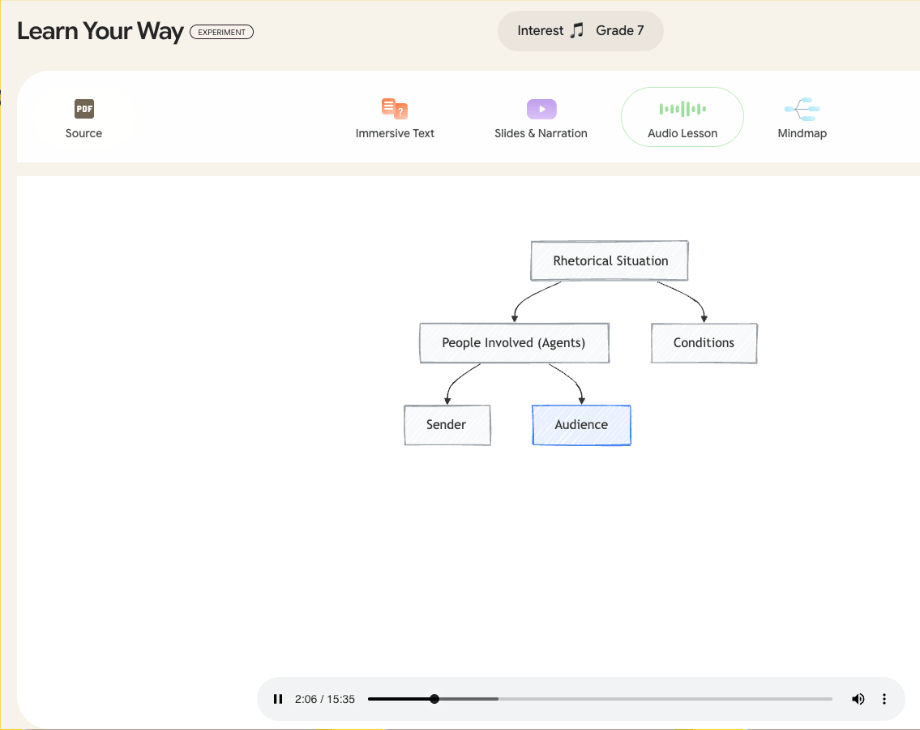
    I also explored Learn Your Way and immediately appreciated the audio lesson feature.

    Figure 2. Learn Your Way interface highlighting multimodal and accessible design features.

    As someone who is dyslexic and does not always prefer traditional reading, being able to listen while engaging with visuals was powerful. What impressed me most was the intentional accessibility. These tools were not just flashy. They were designed with multiple entry points for learners.

    Finally, I spent time with CareerDreamer and had way too much fun with it!

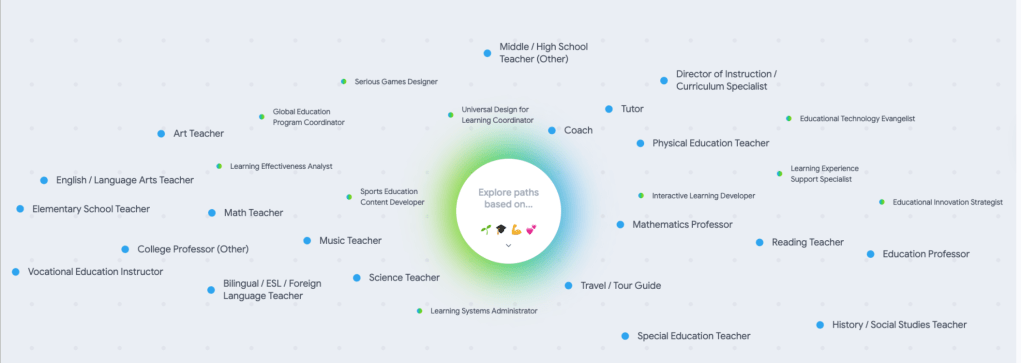
    Figure 3. CareerDreamer “Explore Paths” visualization mapping possible career trajectories.

    Entering my interests, skills, and background and then seeing the “Explore Paths” map felt like opening a door to possibilities. As someone who is not currently anchored to a single professional identity, it was exciting to visualize paths I had not previously considered.

    What this activity reinforced for me is that abstraction is foundational to AI. The system does not “understand” drawings the way humans do. It abstracts features, compares them against patterns in its training data, and makes a prediction.

    I can easily see bringing this into a classroom. Third graders could compare their Quick, Draw! sketches to the AI’s guesses and discuss which details helped the system recognize the image. That conversation naturally connects to pattern recognition and generalization in computational thinking. It also opens the door to discussing how computers learn from human-created data.

    AI feels complex, but at its core, it is pattern recognition at scale. And seeing that process unfold is pretty incredible.

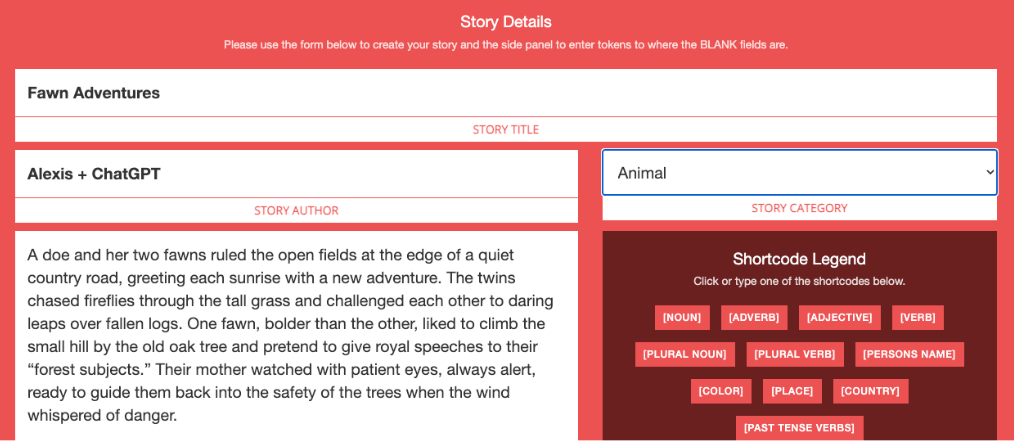
  • For this activity, I started with a detailed story about a doe and her two fawns.

    Figure 1. The original story draft, written in collaboration with ChatGPT before abstracting its structure.

    It was specific. It had setting, tone, personality, and imagery. Then I abstracted it. I used the WordLibs generator from The Word Finder to build and test the abstracted version of my story. I removed the specific nouns, adjectives, and details and replaced them with general word categories:

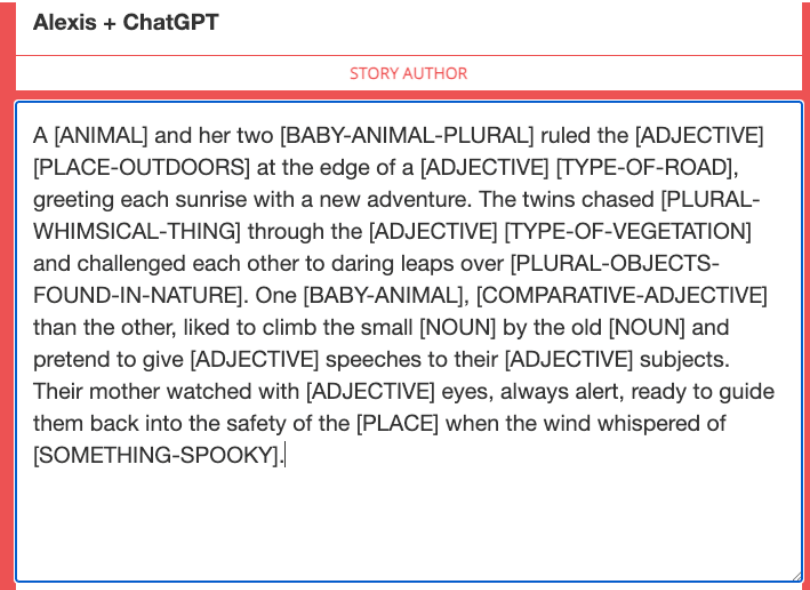
    Figure 2. The abstracted template with generalized word categories replacing specific details.

    [ANIMAL], [PLACE-OUTDOORS], [ADJECTIVE], [PLURAL-OBJECTS-FOUND-IN-NATURE]. The structure of the story stayed the same, but the surface details were flexible.

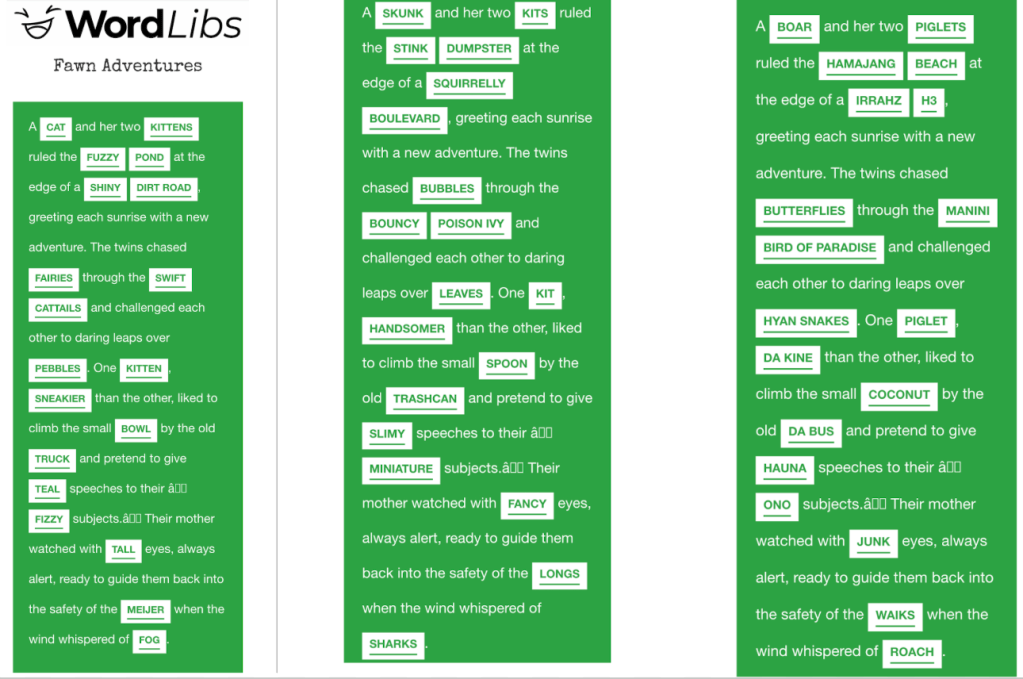
    Figure 3. Multiple completed versions generated from the same abstracted structure.

    That change made something clear: abstraction preserves structure while loosening specificity.

    After receiving feedback, I refined the blanks so the story would still make sense no matter how it was filled in. Too vague, and the story collapses. Too specific, and the creativity disappears. Finding that balance was the real challenge.

    I tend to love when Mad Libs get a little silly, so I intentionally left some categories broader than others. That choice allowed the structure to remain stable while inviting unexpected humor. Having friends in Hawaii complete the story using pidgin added another layer of personality and variation, all within the same underlying framework.

    This activity helped me understand abstraction in a new way. It is not about stripping something down randomly. It is about identifying what must remain constant and what can change.

    The plot arc stayed the same. The characters, setting, and tone became variables. Abstraction made the story reusable. Once the structure is clear, the creativity can vary endlessly.

    Figure 4. Structural view of the story showing its abstracted framework.

  • My next unit focused on abstraction, and it pushed my thinking in a different direction.

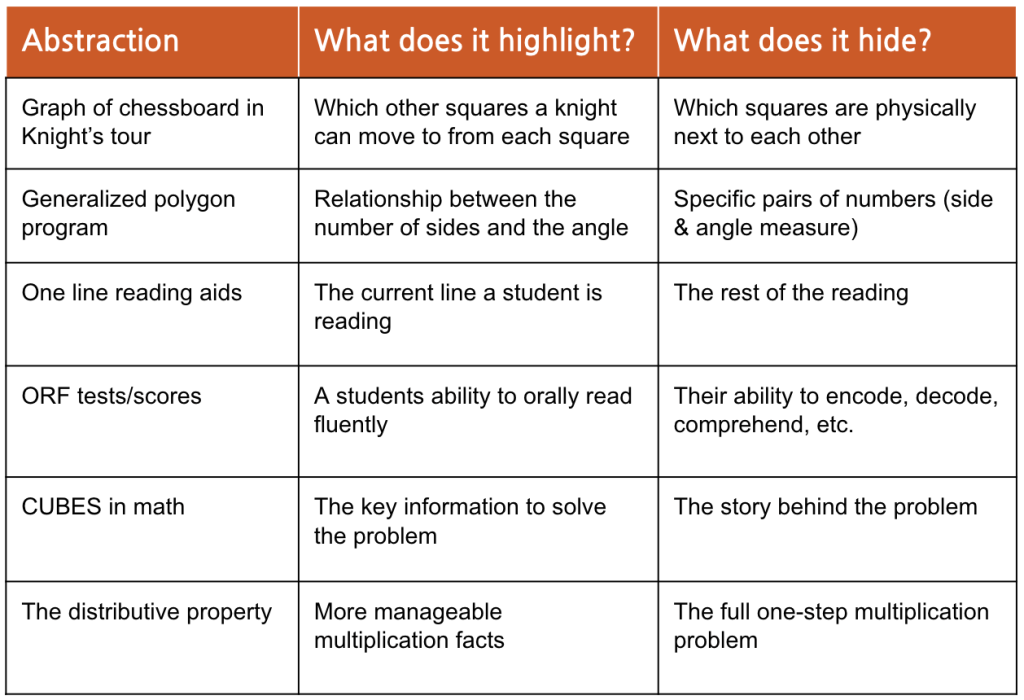
    In our first activity, I examined everyday examples of abstraction and identified what each one highlights and what it hides.

    Figure 1. Examples of abstractions highlighting specific features while intentionally hiding others

    That framing helped make abstraction clear. A graph of a knight’s tour highlights possible moves but hides physical proximity. ORF scores highlight fluency but hide comprehension and encoding skills. The distributive property makes multiplication more manageable but hides the original one-step structure.

    Abstraction is not about simplifying something randomly. It is about intentionally deciding which details matter for a specific purpose.

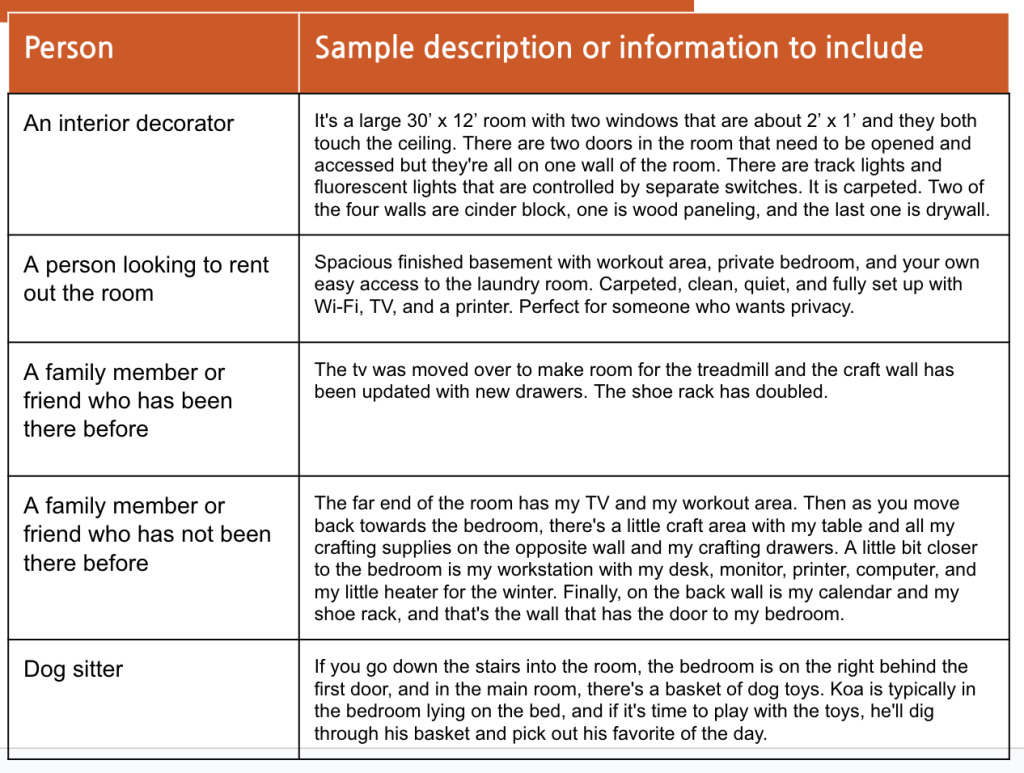
    The second activity made that idea even clearer. I was asked to describe the same room for different audiences: an interior decorator, a renter, a family member, and even a dog sitter. The room did not change. The abstraction did.

    Figure 2. Multiple abstractions of the same room created for different audiences and purposes

    Each description emphasized different details depending on the goal. An interior decorator needed dimensions and materials. A renter cared about privacy and amenities. A dog sitter needed to know where the toys were and where Koa would likely be.

    That activity made abstraction feel less technical and more tangible. We abstract constantly. We filter information based on context, audience, and purpose.

    The most important takeaway for me is that abstraction always involves trade-offs. When we highlight one thing, we hide another. That matters in teaching. It matters in assessment. It matters in technology. Abstraction is not neutral. It is purposeful.

  • For my final creation in unit 4, I created a mini lesson on multiplicative thinking focused on patterns and generalization.

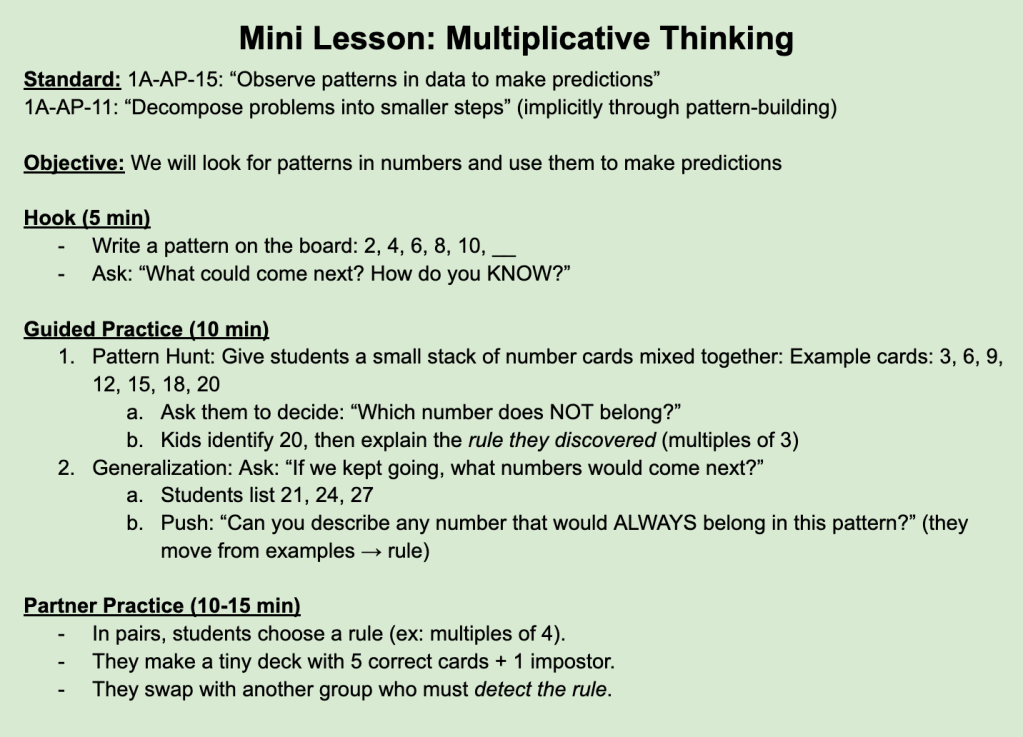
    Figure 1. Mini lesson plan focused on multiplicative thinking and pattern generalization.

    The objective is simple: students observe patterns in numbers and use them to make predictions. We begin with a familiar sequence, 2, 4, 6, 8, 10, __, and ask not just what comes next, but how they know. That shift from answer to explanation is where computational thinking lives.

    As the lesson goes on, students identify an “impostor” number in a mixed set and then move toward generalizing the rule. Instead of listing examples, they articulate the pattern itself. That movement from specific cases to a general rule is valuable.

    What stood out to me while designing this lesson is how closely creativity and learning are connected. Creativity does not always mean inventing something new. Sometimes it comes from seeing a new pattern in the same information. When students begin asking, “What is always true here?” they are engaging in structured discovery.

    I was also personally fascinated by binary during this unit! Exploring how the same sequence of 0s and 1s can represent numbers, letters, or instructions felt like unlocking another layer of meaning. It reinforced how patterns are everywhere, even when they are hidden beneath abstraction.

    This lesson connects directly to my classroom practice. Skip counting and identifying multiples are foundational third-grade skills. Asking students to describe multiple characteristics of a pattern pushes their thinking beyond memorization. It helps them move toward reasoning.

    Patterns are not just about what comes next. They are about why. That “why” is where both computational thinking and creativity begin.

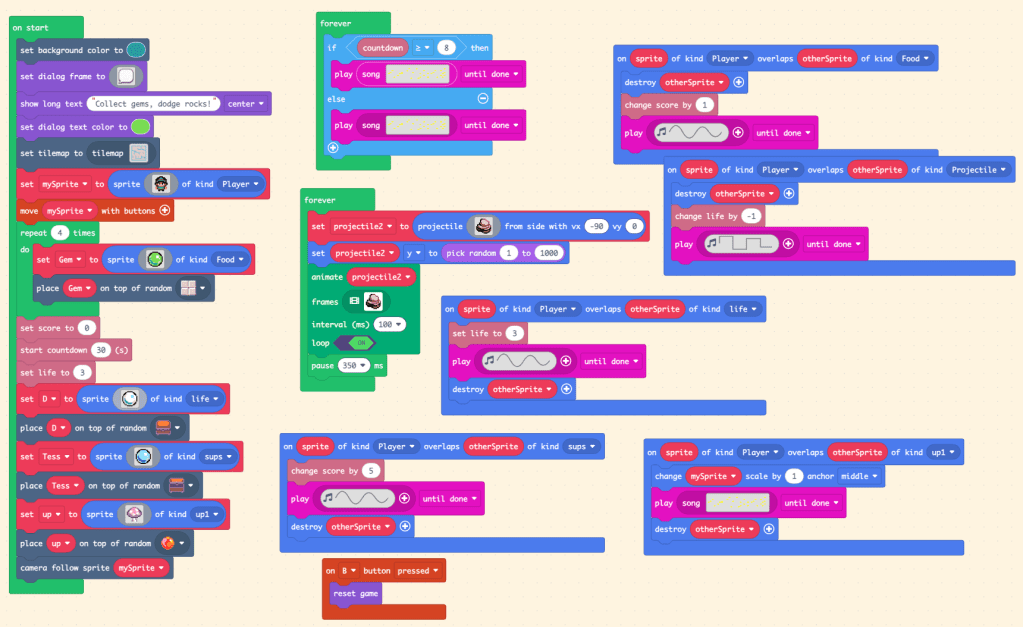
  • This week, I created a game in MakeCode Arcade focused on pattern matching.

    Figure 1. Block-based code structuring gameplay mechanics and custom music design.

    While I enjoyed building the mechanics, what stood out most to me was the music. In my previous projects, I had only discovered how to create custom sounds using solfege. I thought that was the extent of the music features available. In this game, however, I finally discovered the sheet music editor.

    That discovery changed everything!

    Instead of working within a limited sound structure, I was able to compose more intentionally. I could visualize the notes, adjust timing, and design melodies that felt more complete. It expanded what I thought was possible within the platform and added another creative layer to the coding process.

    I also continued experimenting with loops to control repeated behaviors in the game. The more I use them, the more I see opportunities to streamline my code and automate patterns instead of manually scripting each event. Debugging and adjusting the gameplay has become part of the creative cycle rather than a setback.

    This project felt like a shift from simply using available tools to exploring them more deeply. Discovering the sheet music editor reminded me that sometimes growth comes not from learning something entirely new, but from uncovering more of what was already there.

    Thank you for taking the time to follow along with my learning! If you’d like to try the game yourself, you can play it below.